¶ Feature Modifiers Reference Guide (Under Construction)
A detailed guide to feature modifiers available in the feature editor in the Draw Steel Codex.
¶ Table of Contents
¶ What is a Feature Modifier?
Modifiers are a very large component of a feature that contains the data to access game logic built into the Codex. It is one of the core fields within a feature. The Feature Editor Reference Guide describes the other high level fields of a feature and is a good place to start if this is the first time you have created a feature.
¶ Basic Terms in the Reference Guide
Basic terms used in the reference guides for the Feature Editor, Modifiers and Ability Behaviors can be found at the beginning of the Feature Editor Reference Guide under Defining Our Terms.
¶ Note On Table Structure
These notes are repeated from the Feature Editor Reference Guide.
- There are a lot of tables below to explain different elements. The context of an element in the table is the section heading above it. The section heading is the context name as it appears in Codex. A clarifying statement is provided in parentheses for the elements in the table below each section heading.
- Often the same field or subfield label is used in different contexts and the context determines how the field is used in Codex.
- Whenever practical, for fields, subfields and their respective tables that are used within multiple contexts in the same manner, there will be See references and linking so as to not duplicate the table.
- If an Element has a default value you do not need to do anything if you don’t need that field. Many fields require a default value that Codex ignores or treats as all values when parsing.
- Bottom level value tables comprised only of values typically duplicate lists in the Compendium. Where a set of values share matching traits, the table will be truncated in the interest of space and there will be an indication of additional values available at the bottom of the table. Values created by users are implicitly included in the table corresponding to their location in the Compendium.
¶ Modifiers List
¶ Description
The table below lists the modifiers available for the Add Modifier field on a Feature. One or more Modifiers will hold the data to instantiate the feature in the front end user interface. Some modifiers have a handful of fields and several will have dozens depending on the exact feature being implemented. Multiple modifiers can be included in one feature.
| Value | Function | Notes |
|---|---|---|
| Ability Improvement | Improve an ability (e.g. increase target count, range or radius | Optional |
| Access to new types of kits | Grant access to additional kit types | Optional |
| Activated Ability | Grant an activated ability the bearer can use | Optional |
| Alternate Appearance | Present the bearer as a different visual form | Optional |
| Aura | Project an aura affecting nearby creatures | Optional |
| Bestow Condition | Automatically apply a condition to the bearer | Optional |
| Casting Origin | Specify where the bearer’s ability casts originate | Optional |
| Condition Immunity | Grant immunity to specified conditions | Optional |
| Damage Immunity | Grant immunity or resistance to damage types | Optional |
| Filter | Run a GoblinScript predicate to gate who the bearer can target | Optional |
| Forced Movement | Enable forced movement on the bearer | Optional |
| Grant Resource | Grant a tracked resource (uses, charges, heroic-resource pool) | Optional |
| Grant Skill or Language | Grant proficiency in a skill, language, save, or equipment group | Optional |
| Growing Resources Table | Provide a resource table that scales with level | Optional |
| Invisibility | Make the bearer invisible to other creatures | Optional |
| Journal Explanation | Append explanatory text to journal entries | Optional |
| Light Source | Emit light from the bearer within a radius | Optional |
| Modify Abilities | Modify existing activated abilities on the bearer | Optional |
| Modify Attribute | Modifier that imposes a change to an attribute value on subject of the feature | Optional |
| Modify Creature Type | Change the bearer’s creature type classification | Optional |
| Modify Mount Riders | Modify mount-rider configurations | Optional |
| Modify Power Rolls | Add custom options or tier effects to a power roll table | Optional |
| Modify Resource Checklist | Customize the heroic-resource checklist display | Optional |
| Modify Squad Captain | Modify the captain role in a squad | Optional |
| Modify Trigger | Modify an existing triggered ability | Optional |
| Power Roll Trigger | Add a triggered effect on specific power roll tier results | Optional |
| Power Roll Trigger Addition | Add an additional option to an existing power roll trigger | Optional |
| Reciprocal Condition | Apply a condition to creatures that damage the bearer | Optional |
| Reminder Text | Display reminder text when the bearer moves | Optional |
| Routine | Display a read-only routine for reference | Optional |
| Status Icon | Add a status icon or visual indicator to the bearer | Optional |
| Suppress Abilities | Hide or disable specified abilities | Optional |
| Suspended In Air | Suspend the bearer at a specified altitude | Optional |
| Transformation | Allow the bearer to assume an alternate form | Optional |
| Triggered Ability | Grant a triggered ability that fires on specific events | Optional |
| Triggered Ability Display | Display a read-only triggered ability for reference | Optional |
¶ Activated Ability
¶ Description
Grant an activated ability the bearer can use.
The Activated Ability modifier is used to make a feature a selectable ability that typically spends an action (Main, Maneuver, Move, but also Free Maneuver). Below are the top level subfields for Activated Ability. Below them each subfield will have its own table of values. Edit Ability is a button that opens an editor modal within the Feature Editor to build out an activated ability. The subfields in the ability editor will be detailed as well.
| Subfield | Definition | Required? | Default Value | Interaction With GoblinScript | Location in Front End? |
|---|---|---|---|---|---|
| Condition | Goblinscript to test when feature should be available to user | Optional | none | Yes; see formula documentation in UI and GoblinScript V2 | when condition not met this ability will not be visible to user |
| No Usage Limit | Dropdown List of rates ability can be used | Required | No Usage Limit | — | — |
| Suppress Other Abilities With Same Name | Toggle that sets system to ignore other abilities with the same name within the same Source as this ability | Required | Off (empty box) | — | — |
| Edit Ability | Button that opens the ability editor for this Activated Ability | — | — | — | — |
¶ No Usage Limit
(Values Available in this Dropdown List)
¶ Description
Rate this ability can be used.
¶ Number of Values Allowed: 1
| Value | Definition | Interaction With GoblinScript | Location in Front End? |
|---|---|---|---|
| No usage limit | — | — | — |
| Per Turn | Can use ability once per turn | — | — |
| Per Round | Can use ability once per round | — | — |
| Per Encounter | Can use ability once per encounter | — | — |
| Per Rest | Can use ability once per respite | — | — |
| Per Level | Can use ability once per level | — | — |
| Manual Refresh | — | — | — |
| Unbounded | — | — | — |
| Global | — | — | — |
¶ Edit Ability
(Button that opens Ability Editor for Activated Ability)
¶ Description
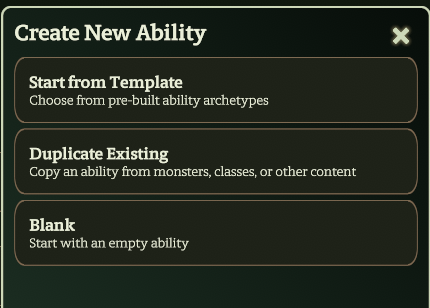
The Edit Ability modal, commonly known as the ability editor, for Activated Ability has 28 high level subfields. Many of them have subfields. When opened, the ability editor offers a menu with options to get started:
| Options | Description |
|---|---|
| Start From Template | The Compendium contains several templates that will pre-populate fields according to the template. You can then edit or remove those fields as needed and add more. |
| Duplicate Existing | Opens an activated ability name search in the Codex with a variety filters. Allows duplicating an ability from elsewhere in the Codex without affecting the original and can be edited as needed. |
| Blank | All fields are empty or have default values. |
¶ Editor Tabs (Left) and Preview Panel (Right)
The editor is broken up into 5 parts, each with a tab selectable from the left menu.
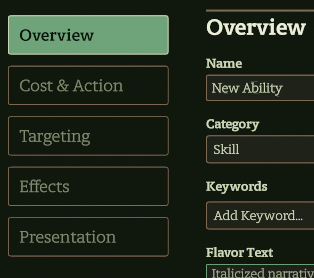
As fields on each of these tabs are filled, the Preview on the right will update to show what you will see in game. The notice at the bottom of the preview is an indicator that says if the Codex recognizes a problem parsing the ability. However, it ignores empty fields and so it cannot generally tell you what is missing with that indicator, only if there is a problem with something that has been entered.
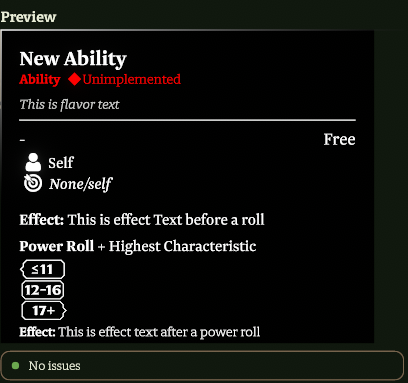
The table below describes the primary fields in the ability editor, most with their own table below to further describe accepted values.
| Subfield | Definition | Required? | Default Value | Interaction With GoblinScript | Editor Tab | |
|---|---|---|---|---|---|---|
| GUID | System generated identifier for ability | Required | Unique | potentially in Lua | Hidden | |
| Name | Name of ability | Required | Feature Name | — | Overview | |
| Category | Category of Activated Ability; determines which list includes ability in action bar | Required | Skill | Used in Goblinscript to filter abilities with specific categories | Overview | |
| Keywords | Keywords assigned to this ability | Optional; multiple values allowed | None (dropdown list) | Checked in Self.Keywords; Target.Keywords; Caster.Keywords; Attacker.Keywords; Moving Creature.Keywords; Ability.Keywords; UsedAbility.Keywords |
Overview | |
| Flavor Text | Evocative descriptive text for an ability | Optional | empty | — | Overview | |
| Effect Before Power Roll | Text description of effect that takes place before power roll | Optional | empty | — | Overview | |
| Effect After Power Roll | Text description of effect that takes place after power roll | Optional | empty | — | Overview | |
| Implementation Status | Declares level of automation of ability; see defintions and values available in Implementation Field in Feature Editor Reference Guide | Required; for values other than Unimplemented it opens a text box to hold implementation notes that are visible to players when they hover over implementation status in game |
Unimplemented | — | Overview | |
| Source | Rules source for ability | Optional | (None) | — | Overview | |
| Display Order | — | Required | 0 | — | Overview | |
| Modes | Allows user to select from multiple versions of the same ability | Required | No Modes (dropdown list) | Checked in Cast.Mode |
Overview | |
| Action | Type of action spent to perform the Activated Ability | Required | No Action | Causes some boolean values to be true when present in ability | Cost & Action | |
| Resource Cost | Type of resource spent to use this Activated Ability | Required | None (dropdown list) | See subfield values for interactions | Cost & Action | |
| Channel Resources | Type of resource spent to use optional component of this ability | Required | None (dropdown list) | — | Cost & Action | |
| Strain | Adds strain functionality on ability | Optional | Off (empty box) (Toggle) | — | Cost & Action | |
| Persistence | Adds persistence functionality on ability | Optional | Off (empty box) (Toggle) | — | Cost & Action | |
| Special Properties | List of toggles for specific game logic applied to this ability not otherwise specified in other subfields; more details on options detailed in table below | Optional | select relevant toggles | Checked in some circumstances to determine if ability is available in those circumstances | Cost & Action | |
| Target Type | Top level type of targeting logic applied to ability | Required | None/Self | see subfield values for interactions | Targeting | |
| Cast immediately when clicked | Subfield of Target Type that appears by default because default Target Type = None/Self; toggle that starts ability resolution without further confirmation from user |
Required | Off (empty box) | — | Targeting | |
| Target Filter | GoblinScript that sets condition that must be true to affect targets | Optional | empty | — | Targeting | |
| Range Text | Range value on ability card | Required | determined by Target Type value | — | Targeting | |
| Target Text | Target value on ability card | Required | determined by Target Type value | — | Targeting | |
| Add Behavior | High level subfield that contains the automation instructions for an ability. See Feature Modifier Behaviors for detailed guidance | Optional | Use Add Behavior button on Effects tab to select a behavior to add | Contains GoblinScript subfields and values | Effects | |
| Custom Icon | Toggle that allows replacement of default icon with uploaded or selected image and color settings for seelection image | Optional | Off (empty box) (Toggle) | — | Presentation | |
| Cast Effect | — | — | (None) | — | Presentation | |
| Impact Effect | — | — | (Invalid) | — | — | Presentation |
| Projectile | — | — | Choose projectile (placeholder) | — | Presentation |
Relocated Fields (location tbd)
| Add Ability Filter | Button that opens filter field that limit access to ability | Optional | inactive | evaluated if present |—|
| Add Reasoned Filter | Button that spawns subfields to add condition that must be true to affect targets | Optional | inactive | see subfield values for interactions |—|
¶ Category Subfield
(Values Available in this Dropdown List)
¶ Description
Used to classify abilities so they can be referenced within Codex and made available to users in appropriate circumstances and excluded in others. Also informs which action button the ability sits above in the action bar.
¶ Number of Values Allowed: 1
¶ Compendium Path:
| Value | Definition | Interaction With GoblinScript | Location in Front End? |
|---|---|---|---|
| Ability | Declares ability is an ability; distinct from Skill | Text value that can be checked in Ability.Categorization ; UsedAbility.Categorization |
Action Button List |
| Basic Attack | Ability that has an attack that does static damage not determined by an Ability Roll | Text value that can be checked in Ability.Categorization ; UsedAbility.Categorization |
Action Button List |
| Common Ability | Ability typically available to all allied creatures | Text value that can be checked in Ability.Categorization ; UsedAbility.Categorization |
Action Button List |
| Heroic Ability | An ability used by a hero that costs a Heroic Resource to activate. (Heroes, 70) | Text value that can be checked in Ability.Categorization ; UsedAbility.Categorization ; Makes Ability.Heroic and UsedAbility.Heroic true for an ability |
Action Button List |
| Hidden | Ability not explicitly selectable by users in user interface; can be revealed and activated in context of Modes and other contexts; supports other forms of functionality in UI | Text value that can be checked in Ability.Categorization ; UsedAbility.Categorization |
— |
| Malice | Ability that requires director spend malice to activate (Monsters, 4) | Text value that can be checked in Ability.Categorization ; UsedAbility.Categorization |
Action Select List |
| Move | An ability that allows a creature to move around the battlefield. (Heroes, 272) | Text value that can be checked in Ability.Categorization ; UsedAbility.Categorization |
Action Select List |
| Signature Ability | An ability used by a hero that does not cost a Heroic Resource to activate, but can have optional features that cost HR (Heroes, 70) | Text value that can be checked in Ability.Categorization ; UsedAbility.Categorization |
Action Select List |
| Skill | Default category | Text value that can be checked in Ability.Categorization ; UsedAbility.Categorization |
Action Select List |
| Trigger | An ability that fires when a stated condition is met (Heroes, 267) | Text value that can be checked in Ability.Categorization ; UsedAbility.Categorization |
Action Select List |
| Villain Action | Ability available to some monsters activated after a hero turn (Monsters, 4) | Text value that can be checked in Ability.Categorization ; UsedAbility.Categorization |
Action Select List |
¶ Action Subfield
(Values Available in this Dropdown List)
¶ Description
Used to identify the type of action spent to perform an activity. The Compendium path listed is where some display functionality is handled. Changing basic action functionality is not recommended.
¶ Number of Values Allowed: 1
¶ Compendium Path: Codex => Compendium => Resources
| Value | Definition | Interaction With GoblinScript | Location in Front End? |
|---|---|---|---|
| No Action | Default value; ability that does not spend an action during a turn or Respite; common value for abilities contained within an ability | — | In ability card, on right, under line - “Free” |
| Free Maneuver | Activated Ability that can be used as long as user can perform maneuvers on their turn | — | In ability card, on right, under line - “Free” |
| Free Triggered Action | Acitvated Ability that can fire as often as the triggering condition is met, on or off turn | Makes Ability.Trigger and UsedAbility.Trigger true for an ability |
Type field in triggered ability card display |
| Main Action | Activated Ability that spends user’s main action to perform the ability | Makes Ability.Main Action and UsedAbility.Main Action true for an ability |
In ability card, on right, under line - “Main Action” |
| Maneuver | Activated Ability that spends user’s maneuver to perform the ability | Makes Ability.Maneuver and UsedAbility.Maneuver true for an ability |
In ability card, on right, under line - “Maneuver” |
| Respite Activity | Activated Ability that spends user’s respite activity to perform the ability | — | Available in Downtime tab of sheet |
| Trigger | Activated Ability that spends user’s triggered action for the round to perform the ability | Makes Ability.Trigger and UsedAbility.Trigger true for an ability |
Type field in triggered ability card display |
| Villain Action | Activated Ability that consumes a monster’s villain action for the round to perform the ability. | — | In ability card, on right, under line - “Villain Action 1/2/3” |
¶ Add Keyword Subfield
(Values Available in this Dropdown List)
¶ Description
The keywords available to assign to an ability. These are the same keywords that are present in Draw Steel Heroes and Draw Steel Monsters with additional keywords to reference certain sets of abilities that share traits in Codex, such as routines.
¶ Number of Values Allowed: Many
¶ Compendium Path: N/A (This is a controlled vocabulary that is not editable in the Compendium. It can be edited with Lua. Use caution)
| Value | Definition | Interaction With GoblinScript | Location in Front End? |
|---|---|---|---|
| Air | Magical element of movement (Heroes, 113) | Text value that can be checked in Self.Keywords; Target.Keywords; Caster.Keywords; Attacker.Keywords; Moving Creature.Keywords; Ability.Keywords; UsedAbility.Keywords |
Left side of ability cards, under line |
| Animal | Type of creature | Text value that can be checked in Self.Keywords; Target.Keywords; Caster.Keywords; Attacker.Keywords; Moving Creature.Keywords; Ability.Keywords; UsedAbility.Keywords |
Left side of ability cards, under line |
| Area | Type of targeting that affects a number of connected squares | Text value that can be checked in Self.Keywords; Target.Keywords; Caster.Keywords; Attacker.Keywords; Moving Creature.Keywords; Ability.Keywords; UsedAbility.Keywords |
Left side of ability cards, under line |
| Beastheart | Aggregates features available to Beastheart class | Text value that can be checked in Self.Keywords; Target.Keywords; Caster.Keywords; Attacker.Keywords; Moving Creature.Keywords; Ability.Keywords; UsedAbility.Keywords |
Left side of ability cards, under line |
| Charge | Aggregates features that can be incorporated into Charge main action | Text value that can be checked in Self.Keywords; Target.Keywords; Caster.Keywords; Attacker.Keywords; Moving Creature.Keywords; Ability.Keywords; UsedAbility.Keywords |
Left side of ability cards, under line |
| Chronopathy | Category of Talent abilities that view and manipulate time (Heroes, 187) | Text value that can be checked in Self.Keywords; Target.Keywords; Caster.Keywords; Attacker.Keywords; Moving Creature.Keywords; Ability.Keywords; UsedAbility.Keywords |
Left side of ability cards, under line |
| Companion | Aggregates features available to Beastheart companion creatures | Text value that can be checked in Self.Keywords; Target.Keywords; Caster.Keywords; Attacker.Keywords; Moving Creature.Keywords; Ability.Keywords; UsedAbility.Keywords |
Left side of ability cards, under line |
| Earth | Magical element of permanence (Heroes, 113) | Text value that can be checked in Self.Keywords; Target.Keywords; Caster.Keywords; Attacker.Keywords; Moving Creature.Keywords; Ability.Keywords; UsedAbility.Keywords |
Left side of ability cards, under line |
| Fire | Magical element of destruction (Heroes, 113) | Text value that can be checked in Self.Keywords; Target.Keywords; Caster.Keywords; Attacker.Keywords; Moving Creature.Keywords; Ability.Keywords; UsedAbility.Keywords |
Left side of ability cards, under line |
| Focus | Aggregates features concerning heroic resource of Tactician class | Text value that can be checked in Self.Keywords; Target.Keywords; Caster.Keywords; Attacker.Keywords; Moving Creature.Keywords; Ability.Keywords; UsedAbility.Keywords |
Left side of ability cards, under line |
| Green | Magical element of creation and growth (Heroes, 113) | Text value that can be checked in Self.Keywords; Target.Keywords; Caster.Keywords; Attacker.Keywords; Moving Creature.Keywords; Ability.Keywords; UsedAbility.Keywords |
Left side of ability cards, under line |
| Magic | A source of power | Text value that can be checked in Self.Keywords; Target.Keywords; Caster.Keywords; Attacker.Keywords; Moving Creature.Keywords; Ability.Keywords; UsedAbility.Keywords |
Left side of ability cards, under line |
| and so on… | — | — | — |
¶ Special Properties Subfield
(Values Available in this Dropdown List)
¶ Description
Additional property added to an ability that allows it to function in more than general manner within Codex.
¶ Number of Values Allowed: Many
¶ Compendium Path: Codex => Compendium =>
| Value | Definition | Interaction With GoblinScript | Location in Front End? |
|---|---|---|---|
| Use as Free Strike | Sets ability to be available when making Free Strike | Makes Ability.Usable As Free Strike and UsedAbility.Usable As Free Strike true for an ability |
— |
| Use as Signature Ability | Sets ability to be available when making a Signature Ability | Makes Ability.Usable As Signature Ability and UsedAbility.Usable As Signature Ability true for an ability |
— |
| Remain Hidden | Sets use of ability to not end the hidden condition | — | Hidden status icon and condition remain on token after ability is used |
| All Force Move From Caster | — | — | — |
¶ Resource Cost Subfield
(Values Available in this Dropdown List)
¶ Description
Designates what kind of resource is spent to perform an ability. If selected value has automation in place to deduct resources when an ability is activated, it spawns an additional subfield in editor to hold the numerical cost value. This subfield is detailed below after the Resource Cost value table.
¶ Number of Values Allowed: 1
¶ Compendium Path: N/A
| Value | Definition | Interaction With GoblinScript | Location in Front End? |
|---|---|---|---|
| None | Default value | Cost is treated as 0 | — |
| Epic Resource | Tenth level resource available to heroes | — | — |
| Hero Tokens | Heroic party resource | — | — |
| Heroic Resource | Any heroic resource | sets Ability.Heroic Resource Cost and UsedAbility.Heroic Resource Cost to Num. Resources value |
Cost appears on action button and in parentheses next to name on ability card |
| Malice | Director resource to activate certain monster abilities | sets Ability.Heroic Resource Cost and UsedAbility.Heroic Resource Cost to Num. Resources value |
Cost appears on action button and in parentheses next to name on ability card |
| Project Points | Crafting resource generated by heroes and followers | — | — |
| Rampage | Resource of Beastheart companion creature | — | — |
| Recovery | Resource to restore stamina | — | — |
| Surges | Resource to increase damage or potency of an ability | — | — |
¶ Num. Resources Subfield
(Value Available for this Subfield of Resource Cost)
¶ Number of Values Allowed: 1
| Value Type | Definition | Default Value | Resource Cost Values That Require Num. Resources |
|---|---|---|---|
| GoblinScript | Goblinscript formula (documentation in UI and goblinScript V2) or Number | 1 | Epic Resource; Heroic Resource; Malice; Project Points; Surges |
¶ Channel Resources Subfield
(Values Available in this Dropdown List which also have Subfields)
¶ Description
Sets the resource cost type of an optional component of an ability. All but default value spawns three additional subfields in editor to hold the maximum spend possible, the numerical cost for each instance of a spend, called a charge, and a text description. These subfields are detailed below after the Channel Resources value table.
¶ Number of Values Allowed: 1
¶ Compendium Path: N/A
| Value | Definition | Interaction With GoblinScript | Location in Front End? |
|---|---|---|---|
| None | Default value | Channel functionality is not available | — |
| Epic Resource | Tenth level resource available to heroes | — | Cost and charges available are presented during ability resolution |
| Hero Tokens | Heroic party resource | — | Cost and charges available are presented during ability resolution |
| Heroic Resource | Any heroic resource | — | Cost and charges available are presented during ability resolution |
| Malice | Director resource to activate certain monster abilities | — | Cost and charges available are presented during ability resolution |
| Project Points | Crafting resource generated by heroes and followers | — | Cost and charges available are presented during ability resolution |
| Rampage | Resource of Beastheart companion creature | — | Cost and charges available are presented during ability resolution |
| Recovery | Resource to restore stamina | — | Cost and charges available are presented during ability resolution |
| Surges | Resource to increase damage or potency of an ability | — | Cost and charges available are presented during ability resolution |
¶ Max Channel Subfield
(Value Available for this Subfield of Channel Resources)
¶ Description
Maximum amount of resources that can be spent on this channeled ability. (Max Channel Value / Cost Per Charge Value) sets the maximum number of charges available for the ability. Charges user cannot afford will not be available to select during resolution.
¶ Number of Values Allowed: 1
| Value Type | Definition | Default Value |
|---|---|---|
| GoblinScript | Goblinscript formula (documentation in UI and GoblinScript V2) or Number | empty |
¶ Cost Per Charge Subfield
(Value Available for this Subfield of Channel Resources)
¶ Number of Values Allowed: 1
| Value Type | Definition | Default Value | Maximum Number of Charges Available to User |
|---|---|---|---|
| Number | Resource cost of each instance of channeled portion of ability | 1 | (Max Channel Value) / (Cost Per Charge Value) |
¶ Description Subfield
(Value Available for this Subfield of Channel Resources)
¶ Number of Values Allowed: 1
| Value Type | Definition | Default Value | Interaction with GoblinScript |
|---|---|---|---|
| Text | Description of channeling aspect of the ability | empty | Field can include Inline Text Substitution; see Special Syntax |
¶ Modes Subfield
(Values Available in this Dropdown List which also have Subfields)
¶ Description
Allows user to select from multiple versions of the same ability. Values other than default spawn additional subfields to name and describe each mode and set a condition for mode’s availablity to user. Spawned subfields will be detailed after the Modes value table. This subfield and its subfields are available in the following editor modals: Activated Ability Editor; Triggered Ability Editor;
¶ Number of Values Allowed: 1
¶ Compendium Path: N/A
| Value | Definition | Interaction With GoblinScript |
|---|---|---|
| No Modes | Default value | Ignored |
| Multiple Modes | Contains subfields describing one or more modes | Subfields set values checked in Cast.Modes |
| Ability Variations | Contains subfields describing one or more ability variations | — |
¶ New Mode
(Value Available for this Subfield of Modes)
¶ Description
Subfield of Multiple Modes and Ability Variations that holds the name of a mode. Once a value is entered into New Mode this subfield label will change to Mode (#) in sequence for each new mode added. When value is entered in New Mode additional subfields for that mode will spawn, described below.
*Note, an additional New Mode field will spawn under each named mode to allow additional modes to be added. Leave empty if not needed.
¶ Number of Values Allowed: 1
| Value Type | Definition | Default Value | Interaction With Goblinscript | Location in Front End? |
|---|---|---|---|---|
| Text | Name of this mode | empty | value checked in Cast.Modes |
Name of mode appears during ability resolution when available to user |
¶ Mode Details
(Value Available for this Subfield of Mode (#))
¶ Description
Subfield of Mode (#) that holds Goblinscript condition that applies to mode named in Mode (#) immediately above this subfield.
¶ Number of Values Allowed: 1
| Value Type | Definition | Default Value | Location in Front End? |
|---|---|---|---|
| Text | Description of this mode | empty | — |
¶ Mode Condition (Value Available for this Subfield of Mode (#))
¶ Description
Subfield of Mode (#) that holds description of mode named in Mode (#) immediately above this subfield. If no condition is set, condition is always true for this mode.
¶ Number of Values Allowed: 1
| Value Type | Definition | Required? | Default Value | Location in Front End? |
|---|---|---|---|---|
| GoblinScript | Goblinscript formula (documentation in UI and GoblinScript V2) | Optional | empty | Mode (#) will appear to user when this condition is true |
¶ Has Ability
(Toggle Available for this Subfield of Mode (#))
¶ Description
Subfield of Mode (#) when Modes = Ability Variations. When On (filled box) spawns Edit Ability modal button. The Edit Ability modal allows creation of an ability only available when using the mode named in Mode (#) subfield immediately above this Has Ability toggle. If Has Ability is set to On but no ability is created, mode appears to user but does nothing when selected.
¶ Number of Values Allowed: 1
| Value Type | Definition | Required? | Default Value |
|---|---|---|---|
| Toggle | Provides Button for Edit Ability modal for this variation | Required | Off (empty box) |
¶ Strain Subfield
(Toggle Available for this Subfield)
¶ Description
This subfield toggle establishes a relationship between an ability and strain functionality. If set to On (full box), adds selection on Ability Behaviors that can apply to ability only when unrestrained or restrained, or always. See Feature Modifier Behaviors for more information on ability behaviors. The Strain subfield is available in the following editor modals: Activated Ability Editor; Triggered Ability Editor;
¶ Number of Values Allowed: 1
¶ Compendium Paths:
Codex => Compendium => Custom Attributes => Strained (defines Strain)
Codex => Compendium => Conditions => Strained (defines Strained condition)
Codex => Compendium => OngoingEffects => Strained Effect Name (for published effects examples)
| Value Type | Definition | Required? | Default Value | Interaction With GoblinScript | Location in Front End? |
|---|---|---|---|---|---|
| Toggle | Adds strain functionality to this ability | Optional | Off (empty box) | Sets if strain functionality applies to this ability | Appears in Effect text on ability card and elsewhere during ability resolution when strained effects are applicable |
¶ Persistence Subfield
(Toggle Available for this Subfield)
¶ Description
This subfield toggle establishes a relationship between an ability and persistence functionality. If set to On (full box), spawns additional subfields to describe persistence effect. Additional subfields are described below. The Persistence subfield and its subfields are available in the following editor modals: Activated Ability Editor; Triggered Ability Editor;
¶ Number of Values Allowed: 1
¶ Compendium Paths: N/A
| Value Type | Definition | Required? | Default Value | Interaction With GoblinScript |
|---|---|---|---|---|
| Toggle | Adds persistence functionality to this ability | Optional | Off (empty box) | Sets if persistence functionality applies to this ability |
¶ Persistent
(Value Available for this Subfield of Persistence Subfield)
¶ Description
Sets heroic resource deduction at start of turn if ability is persisted.
¶ Number of Values Allowed: 1
| Value Type | Definition | Default Value | Location in Front End? |
|---|---|---|---|
| Number | Heroic resource deduction at start of turn to persist this ability | 1 | — |
¶ Behavior
(Values Available in this Dropdown List of Persistence Subfield)
¶ Description
Sets the form of recast of persisted ability at start of following turn. If value is set to None, the Persistent heroic resource deduction takes place but there is not a recast of ability.
¶ Number of Values Allowed: 1
| Value | Definition | Location in Front End? |
|---|---|---|
| Recast (default value) | Ability is cast at beginning of following turn without resource cost | Selected during ability resolution |
| None | Ability is not recast | — |
| Recast as Maneuver | Ability is cast at beginning of following turn and spends creature’s maneuver for the turn | Selected during ability resolution |
| Recast on Same Target | Ability is cast at beginning of following turn on same target; spawns Target Must Be In Range toggle in editor; if toggled On (filled box) target must be in range of ability at beginning of following turn to recast | Selected during ability resolution |
| Recast With One Target | Ability is cast at beginning of following turn on a selected target | Selected during ability resolution |
| Recast with New Ability | Different, designated ability is cast at beginning of following turn; spawns Edit Ability button to open editor modal to create designated ability for this Persistence effect | Selected during ability resolution |
¶ Add Ability Filter
(Subfields Spawned by this Button)
¶ Description
Button opens filter subfields ABOVE the button. Filter value in subfield acts as condition to determine if ability should be filtered out. Each activation of button spawns new set of subfields that act as an additional filter. Add Ability Filter and its subfields are available in the following editor modals: Activated Ability Editor; Triggered Ability Editor;
¶ Number of Values Allowed: Many
| Subfield | Value Type | Definition | Required? | Default Value |
|---|---|---|---|---|
| Filter | GoblinScript | Goblinscript formula (documentation in UI and goblin-scriptv2) | Optional | empty |
| Reason | Text | Explanation for filter | Optional | empty |
¶ Range Text Subfield
(Value Available for this Subfield)
¶ Description
Specific text that will be visible on ability card to describe range of an ability. Icon on ability card to left of text will vary depending on Target Type value. The Range Text subfield is available in the following editor modals: Activated Ability Editor; Triggered Ability Editor;
¶ Number of Values Allowed: 1
| Value Type | Required? | Default Value | Location in Front End? |
|---|---|---|---|
| Text | Required | Set by Target Type value | Left side under keywords on ability card |
¶ Target Text Subfield
(Value Available for this Subfield)
¶ Description
Specific text that will be visible on ability card to describe eligable targets for this ability. Icon on ability card to left of text will vary depending on Target Type value. The Target Text subfield is available in the following editor modals: Activated Ability Editor; Triggered Ability Editor;
¶ Number of Values Allowed: 1
| Value Type | Required? | Default Value | Location in Front End? |
|---|---|---|---|
| Text | Required | Set by Target Type value | Left side under Range Text on ability card |
¶ Target Type Subfield
(Values Available in this Dropdown List)
¶ Description
Base targeting logic for this ability. The default Range Text and Target Text is sourced from subfields that spawn after Target Type is selected. These subfields are detailed after the Target Type value table. Note some of these additional subfields spawn under the Add Reason Filter button and Target Filter subfield. This subfield is available in the following editor modals: Activated Ability Editor; Triggered Ability Editor;
¶ Number of Values Allowed: 1
¶ Compendium Path: N/A
| Value | Definition | Default Range Text | Default Target Text | Interaction With GoblinScript | Additional Subfields |
|---|---|---|---|---|---|
| None/Self | Ability has no target or target’s caster | Self | None/Self | — | Cast immediately when clicked |
| Burst | Affects targets within Range originating from caster (Heroes, 71) | 1 burst | Each creature | — | Can Target Self; Affects; Range |
| Creature | Affects targets that are creatures (Heroes, 73) | 1 | 1 creature | — | Can Target Self; Target Count; Range |
| Creature or Object | Affects targets that are creature or objects (Heroes, 73) | 1 | 1 creature or object | — | Can Target Self; Target Count; Range |
| Allied Creature | Affects targets that are creatures allied with caster (Heroes, 73) | 1 | 1 creature | — | Can Target Self; Target Count; Range |
| Enemy Creature | Affects targets that are creatures that are enemies of caster (Heroes, 73) | 1 | 1 creature | — | Can Target Self; Target Count; Range |
| Dead Creature | Affects targets that are dead creatures | 1 | 1 creature | — | Can Target Self; Target Count; Range |
| Line | Affects targets in line Length x Width that begins within Distance (Heroes, 71) | 1 x 0 line within 1 square | Each creature | — | Can Target Self; Affects; Width; Can Choose Lower Range; Distance; Length |
| Cube | Affects targets within a cube with side lengths equal to Size | 0 cube within 1 square | Each creature | — | Can Target Self; Affects; Size; Range; |
| Empty Space | Affects targets that are empty spaces | 1 | 1 unoccupied space | — | Can Target Self; Targeting; Target Count; Range |
| Empty Space or Friend | Affects targets that are empty spaces or allied creatures | 1 | 1 square | — | Can Target Self; Range |
| Any Space | Affects targeted spaces | 1 | 1 square | — | Can Target Self; Targeting; Target Count; Range |
| All Creatures in Encounter | Affects all targets on map that are creatures | 1 | 1 square | — | Can Target Self |
| Area Template on Map | Affects targets defined by a specific object on map | 1 | Each creature | — | Object ID; Can Target Self; Affects; Range |
¶ Cast immediately when clicked
(Toggle Available for Target Type)
¶ Description
This subfield of Target Type is only available when Target Type = None/Self.
¶ Number of Values Allowed: 1
| Value Type | Definition | Default Value | Location in Front End? |
|---|---|---|---|
| Toggle | Sets if ability use is confirmed before resolution | Off (empty box) | — |
¶ Can Target Self
(Toggle Available for Target Type)
¶ Description
This subfield of Target Type is only available when Target Type does not equal None/Self.
¶ Number of Values Allowed: 1
| Value Type | Definition | Default Value | Location in Front End? |
|---|---|---|---|
| Toggle | Sets if ability can target caster of ability | Off (empty box) | Typically described in Target Text on ability card |
¶ Affects
(Values Available for this Subfield of Target Type)
¶ Description
This subfield of Target Type is only available when Target Type = Burst, Line, Cube, or Area Template on Map. Each value changes the default Target Text as indicated.
¶ Number of Values Allowed: 1
| Value | Definition | Associated Default Target Text Value |
|---|---|---|
| Creatures | Affects targets that are creatures (Heroes, 73); default value | Each creature |
| Creatures and Objects | Affects targets that are creature or objects (Heroes, 73) | Each creature or object |
| Allied Creatures | Affects targets that are creatures allied with caster (Heroes, 73) | Each ally |
| Enemy Creatures | Affects targets that are creatures that are enemies of caster (Heroes, 73) | Each enemy |
¶ Range
(Value Available for this Subfield of Target Type)
¶ Description
This subfield of Target Type is only available when Target Type = Burst, Creature, Creature or Object, Allied Creature, Enemy Creature, Object, Dead Creature, Cube, Empty Space, Empty Space or Friend, Any Space, or Area Template on Map.
¶ Number of Values Allowed: 1
| Value Type | Definition | Default Value |
|---|---|---|
| GoblinScript or Number | See Goblinscript formula documentation in UI and GoblinScript V2 | 1 |
¶ Target Count
(Value Available for this Subfield of Target Type)
¶ Description
This subfield of Target Type is only available when Target Type = Creature, Creature or Object, Allied Creature, Enemy Creature, Object, Dead Creature, Empty Space, or Any Space.
¶ Number of Values Allowed: 1
| Value Type | Definition | Default Value |
|---|---|---|
| GoblinScript or Number | See Goblinscript formula documentation in UI and GoblinScript V2 | 1 |
¶ Width
(Value Available for this Subfield of Target Type)
¶ Description
This subfield of Target Type is only available when Target Type = Line. Sets width of targeted area.
¶ Number of Values Allowed: 1
| Value Type | Definition | Default Value |
|---|---|---|
| GoblinScript or Number | See Goblinscript formula documentation in UI and GoblinScript V2 | empty |
¶ Can Choose Lower Range
(Toggle Available for Target Type)
¶ Description
This subfield of Target Type is only available when Target Type = Line.
¶ Number of Values Allowed: 1
| Value Type | Definition | Default Value | Location in Front End? |
|---|---|---|---|
| Toggle | Sets if length of targeted area can be less than full Length of Line | Off (empty box) | — |
¶ Distance
(Value Available for this Subfield of Target Type)
¶ Description
This subfield of Target Type is only available when Target Type = Line. Sets the distance from the caster that the targeted area can start.
¶ Number of Values Allowed: 1
| Value Type | Definition | Default Value |
|---|---|---|
| GoblinScript or Number | See Goblinscript formula documentation in UI and GoblinScript V2 | 1 |
¶ Length
(Value Available for this Subfield of Target Type)
¶ Description
This subfield of Target Type is only available when Target Type = Line. Sets the maximum length of the targeted area.
¶ Number of Values Allowed: 1
| Value Type | Definition | Default Value |
|---|---|---|
| GoblinScript or Number | See Goblinscript formula documentation in UI and GoblinScript V2 | 1 |
¶ Size
(Value Available for this Subfield of Target Type)
¶ Description
This subfield of Target Type is only available when Target Type = Cube. Sets length of each side of a cube target area in squares.
¶ Number of Values Allowed: 1
| Value Type | Definition | Default Value |
|---|---|---|
| GoblinScript or Number | See Goblinscript formula documentation in UI and goblin-scriptv2 | empty |
¶ Targeting
(Values in this Dropdown List Available for this Subfield of Target Type)
¶ Description
This subfield of Target Type is only available when Target Type = Empty Space or Any Space. These Targeting values are used for abilities that include movement or placement of creatures and objects.
¶ Number of Values Allowed: 1
| Value | Definition | Notes |
|---|---|---|
| Direct | Targets space without regard for space between caster and target | — |
| Pathfinding | Allows waypoint setting along target path | — |
| Direct Path | Straight line target path | — |
| Direct Path, Ignoring Creatures | Straight line target path, ignoring impact of creatures on movement cost | — |
| Forced Movement | — | Spawns dropdown list to select type of forced movement |
| Vacated Space | Target path determined by spaces exited by target creature | — |
| Connected Spaces | Targets number of contiguous spaces | — |
| Wall | — | — |
¶ Object ID
(Value Available for this Subfield of Target Type)
¶ Description
This subfield of Target Type is only available when Target Type = Area Template of Map. The Object ID is an alphanumeric string in the Core property of an object under the Name value.
¶ Number of Values Allowed: 1
| Value Type | Definition | Default Value |
|---|---|---|
| Text | Area defined by the area of a designated object in the Objects tab of Map editor | empty |
¶ Add Reasoned Filter
(Subfields Spawned by this Button)
¶ Description
Button opens filter subfields ABOVE the button. Filter value in subfield acts as additional condition to determine if ability should affect a target. Each activation of button spawns new set of subfields that act as an additional filter. If button is activated but no Formula added, it has no effect. The Add Reasoned Filter subfield and its subfields are available in the following editor modals: Activated Ability Editor; Triggered Ability Editor;
¶ Number of Values Allowed: Many
| Subfield | Value Type | Definition | Required? | Default Value |
|---|---|---|---|---|
| Formula | GoblinScript | See Goblinscript formula documentation in UI and goblin-scriptv2 | Optional | empty |
| Reason | Text | Explanation for Add Reasoned Filter | Optional | empty |
¶ Target Filter
(Value Available for this Subfield)
¶ Description
A GoblinScript formula that sets a condition that must be true for the designated Target Type for a target to be affected by this ability. The Target Filter subfield is available in the following editor modals: Activated Ability Editor; Triggered Ability Editor;
¶ Number of Values Allowed: 1
¶ Compendium Path: N/A
| Value Type | Definition | Required? | Default Value |
|---|---|---|---|
| GoblinScript | See GoblinScript formula documentation in UI and goblin-scriptv2) | Optional | empty |
¶ Behavior Subfield
(High Level Subfield in Edit Ability Modal)
¶ Description
The Behavior subfield holds the majority of automation instructions for an ability. Detailed guidance will be found on the Feature Modifier Behaviors page in the DMHub Wiki. Multiple behaviors can be included in a single ability and process in sequence to actualize an ability in game. Though they are described on a separate wiki page, the context of any behavior is the ability in which it is added and the targeting and other data in that ability inform how the behavior functions in game. The Behavior subfield is available in the following editor modals: Activated Ability Editor; Triggered Ability Editor;
¶ Number of Values Allowed: Many
¶ Compendium Path: Codex => Compendium => Various
¶ Source Subfield
(Values Available for this Subfield)
¶ Description
Identifies rules source for this ability. If source is selected, spawns page number field to hold location of rule in the source and an Open button. Button allows access to PDF text that opens to page number in page number subfield.
¶ Number of Values Allowed: 1
¶ Compendium Path: Codex => Compendium =>
| Value | Definition |
|---|---|
| (None) | Default placeholder value |
| Draw Steel Heroes | Core rules for heroes, skill challenges, combat, and equipment |
| Draw Steel Monsters | Core rules for monsters and encounter design |
¶ Modify Attribute
¶ Description
Below are the subfields for Modify Attribute. Modify Attribute allows the setting of various custom attribute symbol values on a sheet, define when those values apply, and the relationship between the applied value and the default value on a sheet. A feature can have multiple instances of Modify Attribute, but each is self-contained. When an attribute is chosen, it sets a default Description value on the Feature.
¶ Number of Values Allowed: 1
¶ Compendium Path: Codex => Compendium => Custom Attributes
| Subfield | Definition | Required? | Default Value | Interaction With GoblinScript | Location in Front End? |
|---|---|---|---|---|---|
| Condition | GoblinScript to test when feature should be available to user | Optional | none | Yes; see formula documentation in UI and GoblinScript V2 | When condition is not met the attribute will not be modified |
| Modification | Type of change being made to default attribute value | Required | Add | — | — |
| Category | The categorization of a set of attributes; useful when searching attribute list | — | All | — | — |
| Attribute | The attribute being modified; also called custom attribute symbol | Required | Agility | Yes; see formula documentation in UI and GoblinScript V2 for specific formulas where an attribute can be referenced | — |
| Value | GoblinScript or number | Required | 1 | Yes; see formula documentation in UI and GoblinScript V2 | Many attribute values are visible in Character Inspecter panel; panel listed under Developer on top left of screen |
¶ Modification Subfield
(Values Available for this Subfield of Modify Attribute)
¶ Description
Text Description. (Bold referenced field/subfield names).
¶ Number of Values Allowed: 1
| Value Type | Definition |
|---|---|
| Add | Adds Value to existing attribute value on sheet |
| Override | Changes existing attribute on sheet to Value |
| Override (set min value) | The attribute will be set to be equal to Value; It will not change if it is already higher than Value |
| Override (set max value) | The attribute will be set to be equal to Value; It will not change if it is already lower than Value |
¶ Category Subfield
(Values Available for this Subfield of Modify Attribute)
¶ Description
Categorization of attributes to simplifyy searching for desired attribute.
¶ Number of Values Allowed: 1
| Value Type | Definition |
|---|---|
| All | Full list of attributes; default value |
| Advancement | Wealth and Renown attributes |
| Basic Attributes | Attributes related to the basic statistics of a sheet |
| Class Specific | Attributes related to a specific class |
| Combat | Attributes that apply specifically to combat |
| Custom | Attributes that serve a specific, otherwise unclassified function |
| During Ability | The Charging attribute |
| Forced Movement | Attributes related to forced movement |
| Monster | Attributes exclusively for monsters |
| Movement | Attributes related to moving on map |
| Potency Resistance | Resistance attributes associated with each characteristic |
| Senses | Sense-based detection attributes |
| Skills | Skill Modifier attributes |
| Spellcasting | Legacy category (ignore) |
¶ Attribute Subfield
(Values Available for this Subfield of Modify Attribute)
¶ Description
Attributes (same as custom attribute symbols) available to modify on a sheet. Full list of published attributes is provided below. User generated attributes will also be added to the available list in a given campaign. The list includes the common custom attribute symbols listed on the GoblinScript V2 page.
¶ Number of Values Allowed: 1
| Attribute (Custom Attribute Symbol) | Value Type | Description | Default Value Before Modification | Category |
|---|---|---|---|---|
| Agility | Number | Agility characteristic of a creature | Determined by sheet | Basic Attributes |
| Agility Potency Resistance | Number | Effective Agility characteristic value that potency effect must overcome | Agility score of creature | Potency Resistance |
| Alchemy Modifier | — | — | — | Skills |
| Alertness Modifier | — | — | — | Skills |
| Architecture Modifier | — | — | — | Skills |
| Blacksmithing Modifier | — | — | — | Skills |
| Block Enemy Movement | Boolean (1/0) | Determines if a creature or object blocks enemy movement | 0 (false) | Movement |
| Bonus Push Damage Into Objects | — | — | 0 | Forced Movement |
| Bonus Range | — | — | — | Combat |
| Brag Modifier | — | — | — | Skills |
| Can Burrow | Boolean | Non-zero if the creature can burrow at full speed | 0 | Movement |
| Can Climb | Boolean | Non-zero if the creature can climb at full speed | 0 | Movement |
| Can Fly | Boolean | Non-zero if the creature can fly (same as Flying Speed > 0) |
0 | Movement |
| Can Shift in Difficult Terrain | Boolean (1/0) | Determines if the creature is allowed to shift in difficult terrain | 0 (false) | Movement |
| Can Swim | Boolean | Non-zero if creature can swim at full speed | 0 | Movement |
| Can Teleport | Boolean | Non-zero if creature can teleport at full speed | 0 | Movement |
| CanMoveThroughWalls | Boolean | If this is greater than 0, the creature can move freely through walls. Used for incorporeal creatures such as ghosts. | 0 | Movement |
| Cannot Be Force Moved | Boolean (1/0) | Determines if the creature cannot be force moved | — | Forced Movement |
| Cannot Be Removed | — | — | — | Combat |
| Cannot Grant Flanking | — | — | — | Custom |
| Cannot Make Opportunity Attacks | — | — | — | Combat |
| Cannot Regain Stamina | — | — | — | Combat |
| Cannot Stand | — | — | — | Custom |
| Cannot Use Triggered Abilities | — | — | — | Custom |
| Carpentry Modifier | — | — | — | Skills |
| Charging | Boolean | True (Charging = 1) when the creature is in a charging state during ability use | 0 (false) | During Ability |
| Charging Speed | Number | Maximum straight line distance creature can move as part of a Charge main action | Walking Speed | Movement |
| Climb Modifier | — | — | — | Skills |
| Collison Immunity | — | — | — | Custom |
| Compel Attacks Between | — | — | — | Combat |
| Compel Movement Adjacent | — | — | — | Custom |
| Compel Movement Toward | — | — | — | Custom |
| Conceal Object Modifier | — | — | — | Skills |
| Cooking Modifier | — | — | — | Cooking |
| Corrupted Mentor | — | — | — | Custom |
| Count as Ally to Enemies for Flanking | — | — | — | Custom |
| Creature Size | — | — | — | Basic Attributes |
| Criminal Underworld Modifier | — | — | — | Number |
| Critical Threshold | — | — | — | Custom |
| Culture Modifier | — | — | — | Skills |
| Darkvision | — | — | — | Senses |
| Delay Death | Number | Monsters will delay their death by this number of seconds. Useful if you want to just force a monster to stay alive a little while to make any on-death effects happen. | 0 | Custom |
| Disengage Speed | Number | Maximum distance in squares the creature can shift when taking the Disengage move action | 1 | Movement |
| Disguise Modifier | — | — | — | Skills |
| Disguised | — | — | — | Basic Attributes |
| Drive Modifier | — | — | — | Skills |
| Dying Stamina | Number | The number of stamina when a hero enters the Dying state. | 0 | Custom |
| Dying Value | Number | When a hero reaches this value, they die. | Maximum Stamina/2 | Custom |
| Eavesdrop Modifier | — | — | — | Skills |
| Empathize Modifier | — | — | — | Skills |
| Endurance Modifier | — | — | — | Skills |
| Escape Artist Modifier | — | — | — | Skills |
| Extra Heroic Resource Available | — | — | — | Custom |
| Extra Turns | — | — | — | Basic Attributes |
| Fall Reduction | Number | Amount subtracted from fall distance before damage is calculated for the creature | Max(0, Agility) |
Forced Movement |
| Flank From Any Direction | — | — | — | Basic Attributes |
| Flanking Immunity | — | — | — | Custom |
| Fletching Modifier | — | — | — | Skills |
| Flirt Modifier | — | — | — | Skills |
| Force Orbs | — | — | — | Class Specific |
| Force Remain on Map | — | — | — | Custom |
| Forced Movement Bonus | Number | The amount of additional spaces this creature can move another creature when it inflicts forced movement. | 0 | Forced Movement |
| Forced Movement Damage Reduction | Number | Whenever you take damage from being force moved, you reduce that damage by an amount. | 0 | Forced Movement |
| Forced Movement Increase | Number | Increases the distance this creature is moved when it is subject to forced movement. | 0 | Forced Movement |
| Forgery Modifier | — | — | — | Skills |
| Free Strike Bonus | — | — | — | Monster |
| Freely Move Through Enemies | — | — | — | Movement |
| Full Speed Grabbing | — | — | — | Movement |
| Gamble Modifier | — | — | — | Skills |
| Gives Cover | Boolean (1/0) | Determines if the creature provides cover to other creatures | 0 (false) | Custom |
| Grab Characteristic | Number | The characteristic score used for grab checks | Might | Custom |
| Grab Range | — | — | — | Combat |
| Grant Flanking to Allies | — | — | — | Custom |
| Gymnastics Modifier | — | — | — | Skills |
| Handle Animals Modifier | — | — | — | Skills |
| Has Cover | Boolean | True (Has Cover = 1) when the creature has cover | 0 (false) | Custom |
| Heal Modifier | — | — | — | Skills |
| Heroic Abilities While Charging | Boolean (1/0) | Determines if the creature can use a heroic ability as part of a Charge main action | 0 (false) | Combat |
| Heroic Resource Gain Modification | — | — | — | Custom |
| Heroic Resource Gain at Start | — | — | — | Class Specific |
| Hide Modifier | — | — | — | Skills |
| History Modifier | — | — | — | Skills |
| Hover | — | — | — | Movement |
| Ignore Concealment | — | — | — | Combat |
| Ignore Concealment Within Range | Number | Concealment is ignored for attacks within this distance | 0 | Combat |
| Ignore Cover | — | — | — | Combat |
| Ignore Difficult Terrain | — | — | — | Movement |
| Ignore Fire Immunity | — | — | — | Combat |
| Ignore Offhand Damage Penalty | — | — | — | Combat |
| Ignore Prone Difficulty | — | — | — | Custom |
| Ignore Stability | Number | If greater than zero, than this creature ignores stability of targets it force moves. Often you will want to use this in an ability duration effect so it happens for a single ability. | 0 | Forced Movement |
| Ignores Bleeding | — | — | — | Custom |
| Immune to Non Damage Effects | — | — | — | Combat |
| Immunity from Opportunity Attack | — | — | — | Combat |
| Initiative Threshold | — | — | — | Custom |
| Interrogate Modifier | — | — | — | Skills |
| Intimidate Modifier | — | — | — | Skills |
| Intuition | Number | Intuition characteristic of a creature | Determined by sheet | Basic Attributes |
| Intuition Potency Resistance | Number | Effective Intuition characteristic value that potency effect must overcome | Intuition score of creature | Potency Resistance |
| Jewelry Modifier | — | — | — | Skills |
| Jump Distance | — | — | — | Movement |
| Jump Modifier | — | — | — | Skills |
| Knockback Caster Size | Number | This is the size of the creature specifically when considering the Knockback maneuver and if the creature can can knock back – specifically you cannot knockback creatures larger than you. It does NOT affect other forced movement. | Size |
Forced Movement |
| Knockback Target Size | Number | This is the size of the creature specifically when considering the Knockback maneuver and if the creature can be knocked back – specifically you cannot knockback creatures larger than you. It does NOT affect other forced movement. | SizeWhenForceMoved |
Forced Movement |
| Knockback Targets | Number | The number of targets a creature can knockback in one maneuver | 1 | Forced Movement |
| Lead Modifier | — | — | — | Skills |
| Lie Modifier | — | — | — | Skills |
| Magic Modifier | — | — | — | Skills |
| MaxMinionSquads | — | — | — | Class Specific |
| Maximum Grabbed Creatures | — | — | — | Combat |
| Maximum Marks | — | — | — | Class Specific |
| Maximum Shields | — | — | — | Custom |
| Maximum Surges | — | — | — | Custom |
| MaximumMinions | — | — | — | Class Specific |
| Mechanics Modifier | — | — | — | Skills |
| Might | — | — | — | Basic Attributes |
| Might Potency Resistance | Number | Effective Might characteristic value that potency effect must overcome | Might score of creature | Potency Resistances |
| Monsters Modifier | — | — | — | Skills |
| Movement Difficulty | — | — | — | Movement |
| Movement Multiplier | — | — | — | Movement |
| Music Modifier | — | — | — | Skills |
| Mute | — | — | — | Custom |
| Nature Modifier | — | — | — | Skills |
| Navigate Modifier | — | — | — | Skills |
| Negative Heroic Resource | — | — | — | Custom |
| No Damage from Forced Movement | Boolean (1/0) | Determines if the creature takes damage from forced movement | 0 (false) | Forced Movement |
| NoDamagefromForcedMovementWithObjects | Boolean (1/0) | Making this true (1) will make a creature no longer take damage from forced movement into an object. | 0 | Forced Movement |
| Nullifying Aura Radius | — | — | — | Custom |
| Num Routines | Number | Number of routines the creature can have active | 1 | Class Specific |
| Number of Kits | — | — | — | Basic Attributes |
| Number of Movement Actions | — | — | — | Movement |
| Perform Modifier | — | — | — | Skills |
| Persuade Modifier | — | — | — | Skills |
| Pick Lock Modifier | — | — | — | Skills |
| Pick Pocket Modifier | — | — | — | Skills |
| Potency Bonus | — | — | — | Custom |
| Presence | Number | Presence characteristic of a creature | Determined by sheet | Basic Attributes |
| Presence Potency Resistance | Number | Effective Presence characteristic value that potency effect must overcome | Presence score of creature | Potency Resistances |
| Primordial Damage | — | — | — | Class Specific |
| Psionics Modifier | — | — | — | Skills |
| Pull Bonus | Number | Bonus the creature has to pull effects | 0 | Forced Movement |
| Push Bonus | Number | Bonus the creature has to push effects | 0 | Forced Movement |
| Reach | — | — | — | Combat |
| Read Person Modifier | — | — | — | Skills |
| Reason | Number | Reason characteristic of a creature | Determined by sheet | Basic Attributes |
| Reason Potency Resistance | Number | Effective Reason characteristic value that potency effect must overcome | Reason score of creature | Potency Resistances |
| Rebound | Number | The number of times forced movement can bounce | 0 | Custom |
| Recovery Value | — | — | — | Basic Attributes |
| Religion Modifier | — | — | — | Skills |
| Renown | Number | Abstract measure of a hero’s reputation | 0 | Advancement |
| Ride Modifier | — | — | — | Skills |
| Rumors Modifier | — | — | — | Skills |
| Sabotage Modifier | — | — | — | Skills |
| Save Bonus | — | — | — | Custom |
| Save Ends | — | — | — | Custom |
| Search Modifier | — | — | — | Skills |
| Shift Disabled | — | — | — | Movement |
| Signature Abilities While Charging | Boolean (1/0) | Determines if the creature can use a signature ability as part of the Charge main action | 0 (false) | Combat |
| Size When Force Moved | — | — | — | Forced Movement |
| SizeWhenGrabbing | Number | This is the size of the creature used when grabbing another creature. | Size |
Combat |
| Slide Bonus | — | — | — | Forced Movement |
| Sneak Modifier | — | — | — | Skills |
| Society Modifier | — | — | — | Skills |
| Speed While Slowed | — | — | — | Movement |
| Spellcasting DC | — | — | — | Spellcasting |
| Spread Bonus | — | — | — | Combat |
| Stability | — | — | — | Forced Movement |
| Stamina | — | — | — | Basic Attributes |
| Stamina Regain Halved | — | — | — | Custom |
| StartTurnSummon | Number | At the start of each of your turns during combat, you summon up to three of your signature minions at no cost into unoccupied spaces within your Summoner’s Range (no action required). | 3 | Class Specific |
| Stop Fall Damage | Number | When number is positive, Fall Damage trigger will not happen | 0 | Forced Movement |
| Strained | Number | State when a Talent has gone into clarity debt | Resources.Heroic Resource < 0 | Class Specific |
| Strategy Modifier | — | — | — | Skills |
| SummonerRange | Number | A Summoner’s Range defines the maximum distance they can summon minions and use specific conjuring abilities. A Summoner’s Range is equal to 5 + their Reason score. | 5 + Reason | Class Specific |
| Swim Modifier | — | — | — | Skills |
| Tailoring Modifier | — | — | — | Skills |
| Timescape Modifier | — | — | — | Skills |
| Toss Bonus | — | — | — | Forced Movement |
| Track Modifier | — | — | — | Skills |
| Untargetable | — | — | — | Combat |
| Unused | — | — | — | Custom |
| Victory Bonus | — | — | — | Custom |
| Vision Range | — | — | — | Senses |
| Void Sense | — | — | — | Senses |
| Walking Speed | Number | Ground movement value of creature in squares (Heroes, 267-268) | Determined by sheet | Movement |
| Wealth | Number | Abstract measure of a hero’s wealth (Heroes, 351) | 1 | Advancement |
| Weight | — | — | — | Basic Attributes |
| Winded | Boolean (1/0) | True (Winded = 1) when stamina is at or below half maximum stamina | Calculated | Custom |
¶ Modify Power Rolls
¶ Description
Add custom options or tier effects to a power roll table.
A Modify Power Roll modifier holds a modification to a power roll that applies to a roll under specified conditions and can manually controlled in the roll dialog box during resolution of an ability. It can modify damage dealt, potency, edges and banes, and tier result text among other options. Multiple modifications can be included in one modifier or in several, each with their own conditions.
¶ Number of Values Allowed: 1
| Subfield | Definition | Required? | Default Value | Interaction With GoblinScript | Location in Front End? |
|---|---|---|---|---|---|
| Name | The name of the power roll modifier | Required | Default’s to name of feature that holds it | — | Modifier name in roll dialog card |
| Description | Short description of the modifier; serves as hover text on modifier in roll dialog card | Optional | empty | — | Text displays when modifier name is hovered over in roll dialog card |
| Apply To | Two dropdown menus that determine the kind of power rolls the modifier applies to and how often the modifier can be applied | Required | Ability Rolls/No usage limit | — | — |
| Resource Cost | Dropdown menu to add to or override cost to use the modified power roll | Optional | None | — | — |
| Add Keyword | Dropdown menu to add keywords as conditions for the modifier to apply to a power roll | Optional | Add Keyword…(empty) | — | — |
| Condition | GoblinScript field to determine if the modifier will be available for a power roll; see formula documentation in UI and GoblinScript V2 | Optional | empty | — | — |
| Roll Requirement | Dropdown of roll modifications that condition if the modifier will apply to a power roll | Optional | None | — | — |
| Activation | Default setting for the modifier when a power roll starts | Required | Never | — | — |
| Roll Mod | Dropdown menu of modification options applied to the dice roll | Optional | None | — | — |
| Modify Potency | Dropdown menu of modification options applied to to any potency parsed in the power roll table result text | — | — | — | — |
| Modify Resistance | Goblinscript formula that modifies the potency resistance of the targets of the power roll; see formula documentation in UI and GoblinScript V2 | Optional | empty | — | — |
| Damage | Goblinscript formula or number that adds damage to targets of the power roll; damage can be added to tier result outcome or separately apply as a specific type; see formula documentation in UI and GoblinScript V2 | Optional | empty | — | — |
| Damage Multiplier | Dropdown menu of modification options that change the aggregate damage by a set multiplier | Required | Full Damage | — | — |
| Damage Type | Two dropdown menus to state what damage type gets changed by the modifier and what type it gets changed into | Optional | Choose… (empty) | — | — |
| Surges | GoblinScript formula or number that adds the designated number of surges to the power roll; a toggle will appear to determine if the gained surges can be saved for future rolls; see formula documentation in UI and GoblinScript V2 | Optional | empty | — | — |
| Adjustments | Plus sign to modify the amount of forced movement or jump distance included in the power roll result; amount can be a GoblinScript formula or number; see formula documentation in UI and GoblinScript V2 | Optional | None | — | — |
| Replace Movement | Dropdown menu of modification options to change one kind of forced movement to another | Optional | None | — | — |
| Add Vertical | Toggle that changes forced movement in a power roll result to vertical | Optional | Off (empty box) | — | — |
| Add to Table | Modification that adds input text to the end of all tiers of the power roll. You can use something like Shift 2/3/4 to apply different amounts to each tier | Optional | empty | — | — |
| Replace In Table | Modification that replaces text in tier results that match left text box with text in right text box | Optional | empty | — | — |
| Has Custom Trigger | Toggle to designate if modifier has a custom trigger; adds edit button to access editor to create the custom trigger | Optional | Off (empty box) | — | — |
¶ Power Roll Trigger
¶ Description
Add a triggered effect on specific power roll tier results.
| Subfield | Definition | Required? | Default Value | Interaction With GoblinScript | Location in Front End? |
|---|---|---|---|---|---|
| Name | The name of the power roll trigger; controls the name of the trigger that appears in the power roll dialog card and trigger prompt (if any) in the action bar; edited automatically to match Name field below; can get temporarily out of sync from other name field if rapdily edited | Required | Triggered Modifier | — | Trigger prompt and reminder in Power Roll dialog card |
| Rules | — | Optional | empty | — | — |
| Condition | This GoblinScript is used to determine whether or not this modifier will be used. If this GoblinScript produces a False result, this modifier will not even appear as an option in dialogs in which this modifier might be used | Optional | empty | Yes; see formula documentation in UI and GoblinScript V2 | — |
| Action | Type of action used by the owner of the ability when the power roll trigger fires | Required | Triggered Action | — | — |
| Target | Who the editor is listening for the trigger to occur on; the creature/object that experiences the trigger event | Required | Self | — | — |
| Multi-target | Determines if the power roll trigger fires on one or all qualified targets | Required | One target | — | — |
| Trigger | Trigger event Codex is listening for on the target(s) | Required | Target Takes Damage | — | — |
| Damage Type | Filter for the Target Takes Damage and Target Deals Damage triggers to limit the trigger firing in response to typed, untyped, or all damage types | All Damage Types | — | — | — |
| Ability Filter | GoblinScript field to restrict trigger to fire in response to designated abilities that match the filter; see formula documentation in UI and GoblinScript V2 | Optional | empty | yes | — |
| Force Re-roll | Toggle | — | — | — | — |
| Name | Name of the power roll trigger that appears as the modifier toggle in power roll card; auto-populates from other Name field; Codex will apply input value to other name field but that can get out of sync for short periods of time if edits are made to one but not the other | Required | Triggered Modifier | — | Power Roll Modifiers toggle list in roll dialog card |
| Description | — | — | — | — | — |
| Apply To | Two dropdown menus | — | — | — | — |
| Resource Cost | Two dropdown menus | — | — | — | — |
| Condition | — | — | — | — | — |
| Roll Requirement | — | — | — | — | — |
| Activation | — | — | — | — | — |
| Roll Mod | — | — | — | — | — |
| Modify Potency | — | — | — | — | — |
| Modify Resistance | — | — | — | — | — |
| Change Target | Toggle | — | — | — | — |
| Damage | — | — | — | — | — |
| Damage Multiplier | — | — | — | — | — |
| Damage Type | — | — | — | — | — |
| Surges | — | — | — | — | — |
| Adjustments | — | — | — | — | — |
| Replace Movement | — | — | — | — | — |
| Add To Table | — | — | — | — | — |
| Replace In Table | — | — | — | — | — |
| Has Trigger Before Ability | — | — | — | — | — |
| Has Custom Trigger | — | — | — | — | — |
| Add Additional Cost Modifier | — | — | — | — | — |
¶ Action (Power Roll Trigger)
(Values Available in this Dropdown List)
¶ Description
Used to identify the type of action spent to perform an activity. The Compendium path listed is where some display functionality is handled. Changing basic action functionality is not recommended.
¶ Number of Values Allowed: 1
¶ Compendium Path: Codex => Compendium => Resources
| Value | Definition | Interaction With GoblinScript | Location in Front End? |
|---|---|---|---|
| Triggered Action | Default value; power roll trigger spends creature’s triggered action for the round when it fires | Makes Ability.Trigger and UsedAbility.Trigger true for an ability |
— |
| Free Triggered Action | Power roll trigger that can fire as often as the triggering condition is met, on or off turn | Makes Ability.Trigger and UsedAbility.Trigger true for an ability |
— |
| Passive | — | — | — |
¶ Target (Power Roll Trigger)
¶ Description
Who the editor is listening for the trigger to occur on; the creature/object that experiences the trigger event.
¶ Number of Values Allowed: 1
¶ Compendium Path: Codex => Compendium =>
| Value | Definition | Notes |
|---|---|---|
| Self | Default value; the creature that owns the power roll trigger | — |
| Self or Ally | The creature that owns the power roll trigger or an ally of that creature | — |
| Ally | An ally of the creature that owns the power roll trigger | — |
| Enemy | An enemy of the creature that owns the power roll trigger | — |
| Any Creature | Any creature token on the same map as the owner of the power roll trigger | — |
¶ Trigger (Power Roll Trigger)
¶ Description
¶ Number of Values Allowed: 1
¶ Compendium Path: Codex => Compendium =>
| Subfield | Definition | Notes |
|---|---|---|
| Makes a Power Roll | The power roll trigger target makes a power roll | power roll trigger affects and modifies roll dialog card currently displayed |
| Target Takes Damage | The power roll trigger target takes damage | — |
| Target Deals Damage | The power roll trigger target deals damage | — |
| Targeted by Strike | The power roll trigger target is targeted by an ability with the Strike keyword | — |
| Target Force Moves Another | The power roll trigger target force moves another target | — |
| Target is Force Moved | The power roll trigger target is force moved | — |
| Target is Casting | The power roll trigger target is using an ability | Covers all activated abilities with and without a power roll |
¶ Triggered Ability
¶ Description
The Triggered Ability modifier adds a triggered ability to a feature that fires when certain circumstances occur in game. This modifier is used to create both Triggered Actions and Free Triggered Actions. Below are the top level subfields for Triggered Ability. Below them each subfield will have its own table of values. Edit Ability is a button that opens the Triggered Ability Editor modal to build out a triggered ability. Though it has the same label, this editor modal has a different layout from the Activated Ability editor modal. For subfields that have the same label as other ability modifiers but are different, the word Triggered has been added to the label that appears in the Feature Editor to differentiate them in the guide. Where the same subfield is used in multiple ability editor modals, there is a link to the subfield table to and from each modal.
| Subfield | Definition | Required? | Default Value | Interaction With GoblinScript | Location in Front End? |
|---|---|---|---|---|---|
| Condition | Goblinscript to test when feature should be available to user | Optional | none | Yes; see formula documentation in UI and GoblinScript V2 | when condition not met this ability will not be visible to user |
| No Usage Limit | Dropdown List of rates ability can be triggered; subfield has same label as Activiated Ability subfield but contains additional option | Required | No Usage Limit | — | — |
| Take Damage | The central component of the trigger is listed in the modifier card on the feature. It is selected in the Trigger Event subfield in the triggered ability editor | Automatically populated from editor | — | — | — |
| Edit Ability | Button that opens triggered ability editor | — | — | — | — |
¶ No Usage Limit Triggered
(Values Available in this Dropdown List)
¶ Description
Rate this ability can be triggered. If usage limit is not limited the trigger will fire whenever the conditions of the trigger are met. If there is a usage limit, once it is reached, the trigger will stop firing until the refresh of the time period takes place. If you would like the option to trigger an ability outside the designated usage limit, set Create manual version of this trigger to On (filled box, see below).
¶ Number of Values Allowed: 1
| Value | Definition | Interaction With GoblinScript | Location in Front End? |
|---|---|---|---|
| No usage limit | — | — | — |
| Per Turn | Can use ability once per turn | — | — |
| Per Round | Can use ability once per round | — | — |
| Per Encounter | Can use ability once per encounter | — | — |
| Per Rest | Can use ability once per respite | — | — |
| Per Level | Can use ability once per level | — | — |
| Manual Refresh | — | — | — |
| Unbounded | — | — | — |
| Global | — | — | — |
| Until Effect Expires | — | — | — |
¶ Edit Ability Triggered
(Triggered Ability Editor)
¶ Description
The Triggered Ability Editor modal is divided into four panels selectable on the left side of the editor.
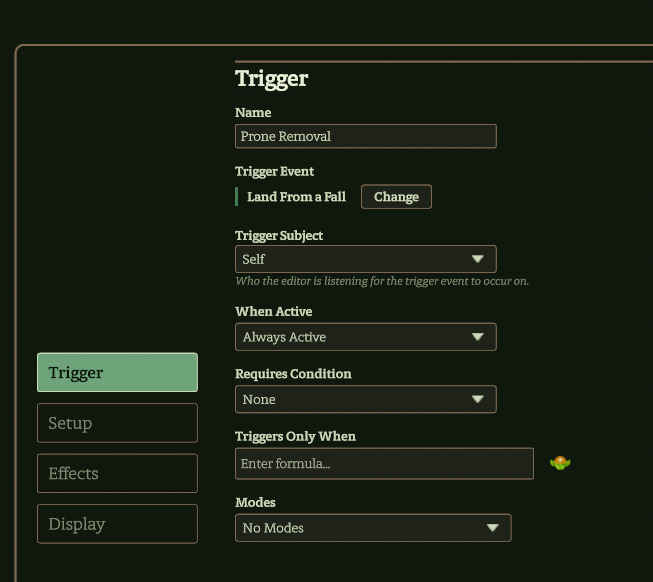
A preview panel on the right side of the editor will update as subfields are filled in the editor. The preview panel will provide a plain text summary of the components of the trigger to the degree the Codex can parse the information. It will also flag if there seems to be an issue in the ability that needs to be addressed. A demonstration video is available on the DMHub YouTube channel
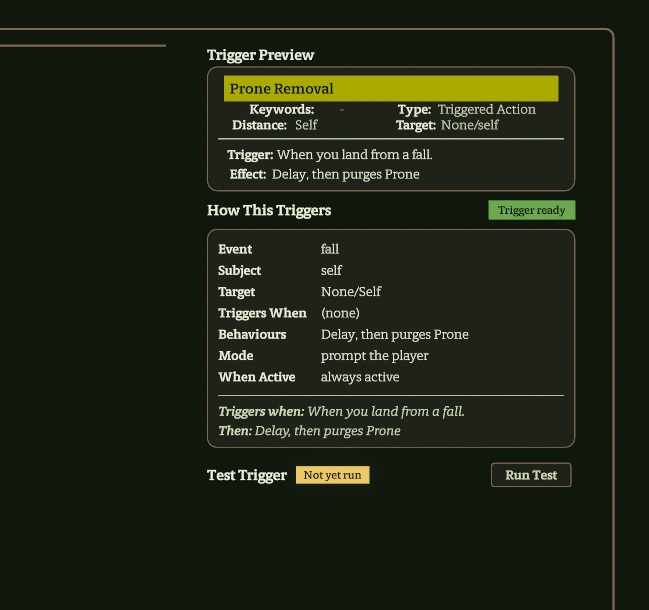
| Subfield | Definition | Required? | Default Value | Interaction with GoblinScript | Editor Panel | Notes |
|---|---|---|---|---|---|---|
| Name | Name of ability | Required | Feature Name | Ability.Name value |
Trigger | — |
| Trigger Event | Defined list of game events that are the core condition for a trigger to fire | Required | Take Damage | — | Trigger | Change button opens searchable modal to select trigger event |
| Trigger Subject | Who the editor is listening for the trigger event to occur on; the creature/object that experiences the trigger event | Required | Self | Subject of this triggered ability; If Trigger Subject is Self, Subject = Self in GoblinScripts for this triggered ability |
Trigger | — |
| When Active | Game state when the trigger can fire | Required | Always Active | — | Trigger | — |
| Requires Condition | One or more defined conditions from the Compendium => Conditions list that must be present on subject for the trigger even to fire | Required | None | — | Trigger | — |
| Triggers Only When | GoblinScript to test when this triggered ability should fire; adds additional requirements to the base Trigger Event that need to be true for a trigger to fire | Optional | — | See formula documentation in UI and GoblinScript V2 | Trigger | — |
| Modes | Allows user to select from multiple versions of the same ability | Required | No Modes (dropdown list) | Checked in Cast.Mode |
Trigger | Mode selected during ability resolution |
| Trigger Mode | Basic setting for how Codex handles a trigger when it fires | Required | Occurs Automatically | — | Setup | — |
| Action Used | Type of action spent to perform the triggered ability | Required | None | Causes some boolean values to be true when present in ability | Setup | — |
| Create manual version of this trigger | Toggle that sets if there is an action button in the action bar under Triggers to fire this triggered ability manually | Required | Off (empty box) | — | Setup | Recommended in most cases to give players and directors full control of trigger |
| Target Type | Top level type of targeting logic applied to ability | Required | None/Self | see subfield values for interactions | Setup | — |
| Cast immediately when clicked | Subfield of Target Type that appears by default because default Target Type = None/Self; toggle that starts ability resolution without further confirmation from user |
Required | Off (empty box) | — | Setup | — |
| Target Filter | GoblinScript that sets condition that must be true to affect targets | Optional | empty | — | Setup | — |
| Range Text | Range value on ability card | Required | determined by Target Type value | — | Setup | Left side under keywords on ability card |
| Target Text | Target value on ability card | Required | determined by Target Type value | — | Setup | Left side under Range Text on ability card |
| When Target Despawns | — | — | — | — | Setup | — |
| Add Behavior | Button to select behaviors to automate triggered ability. See Feature Modifier Behaviors for detailed guidance on each behavior | Optional | — | — | Effects | — |
| Custom Icon | Toggle that allows replacement of default icon with uploaded or selected image and color settings for seelection image | Optional | Off (empty box) (Toggle) | — | Display | — |
| Description | Text box to describe ability in Compendium | Optional | empty | — | Display | — |
| Display Name | Overrides the card title. If blank display uses the ability name | Optional | empty | — | Display | Overrides derived value |
| Card Type | Card title-bar colour and type row label | Required | Triggered Action | — | Display | — |
| Cost | Free text shown in the card title, e.g. ‘1 Heroic Resource’ | Blank uses the numeric resource cost as a fallback | — | — | Display | Overrides fallback value |
| Keywords | Shown in the keywords row on the card | Optional | none | — | Display | — |
| Distance | Range of effect behavior | Optional | Blank - derived from behaviour range | — | Display | Overrides derived value |
| Target | Target of effect behavior | Optional | Blank - derived from behaviour target | — | Display | Overrides derived value |
| Flavor | Descriptive text | Optional | Optional italic flavour line above the card body | — | Display | — |
| Trigger | Trigger criteria | Optional | Blank = auto-derived from event + condition | — | Display | Overrides derived value |
| Effect | Effect description | Optional | Blank = auto-derived from behaviour list | — | Display | Overrides derived value |
¶ Trigger Event
¶ Description
The core circumstance that the Codex is listening for to fire a triggered ability. Each trigger event can be further conditioned with other subfield values, particularly Triggers Only When. The Change button opens up a search modal that allows browsing or searching for trigger events. These are categorized for browsing with the most common at the top of the list. In the definitions below, unless otherwise stated, the creature refers to the trigger subject.
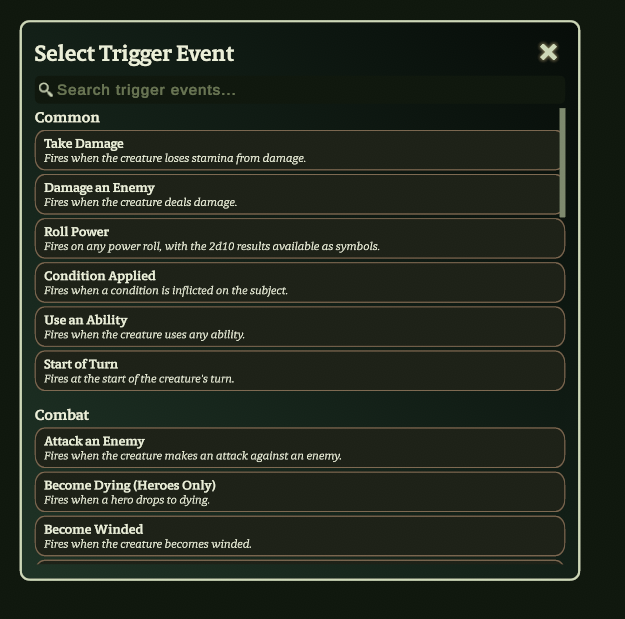
| Trigger Event Name | Definition | Example Ability With This Event | Possible Uses | Category | Notes |
|---|---|---|---|---|---|
| Take Damage | Fires when the creature loses stamina from damage | — | — | Common | — |
| Damage an Enemy | Fires when the creature deals damage | — | — | Common | — |
| Roll Power | Fires on any power roll, with the 2d10 results available as symbols | — | — | Common | — |
| Condition Applied | Fires when a condition is inflicted on the subject | — | — | Common | — |
| Use an Ability | Fires when the creature uses any ability | — | — | Common | — |
| Start of Turn | Fires at the start of the creature’s turn | — | — | Common | — |
| Attack an Enemy | Fires when the creature makes an attack against an enemy | — | — | Combat | — |
| Become Dying (Heroes Only) | Fires when a hero drops to dying | — | — | Combat | — |
| Become Winded | Fires when the creature becomes winded | — | — | Combat | — |
| Creature Lands On You | Fires when a falling creature lands on this creature | — | — | Combat | — |
| Death | Fires when the creature dies | — | — | Combat | — |
| Drop to Zero Stamina | Fires when the creature reaches zero stamina | — | — | Combat | — |
| Kill a Creature | Fires when the creature kills another creature | — | — | Combat | — |
| Made Reactive Roll Against damage | Fires when the creature makes a reactive roll to reduce damage | — | — | Combat | — |
| Regain Stamina | Fires when the creature regains stamina | — | — | Combat | — |
| Finish Using an Ability | Fires after the creature finishes resolving an ability | — | — | Abilities & Power Rolls | — |
| Targeted by an Ability | Fires when the creature is targeted by another creature’s ability | — | — | Abilities & Power Rolls | — |
| Use Signature Attack or Area | Fires when the creature uses a signature Strike or Area ability | — | — | Abilities & Power Rolls | Signature must have the Strike or Area keyword for trigger to fire |
| Adjacent Creature Moves Away | Fires when a creature adjacent to this one moves away | — | — | Movement | — |
| Begin Movement | Fires at the start of the creature’s movement | — | — | Movement | — |
| Break Through a Wall | Fires when the creature breaks through a wall | — | — | Movement | — |
| Collide with a Creature or Object | Fires when the creature collides with something during forced movement | — | — | Movement | — |
| Complete Movement | Fires when the creature finishes moving | — | — | Movement | — |
| Force Moved | Fires when the creature is pushed, pulled, or slid | — | — | Movement | — |
| Land From a Fall | Fires when the creature lands after a fall | — | — | Movement | — |
| Move Through Creature | Fires when the creature moves through another creature’s space | — | — | Movement | — |
| Stepped off a Pressure Plate | Fires when a creature steps off a pressure plate tile | — | — | Movement | — |
| Stepped on a Pressure Plate | Fires when a creature steps on a pressure plate tile | — | — | Movement | — |
| Teleport | Fires when the creature teleports | — | — | Movement | — |
| Earn Victory | Fires when the creature earns victories | — | — | Resources & Victory | — |
| Gain Resource | Fires when the creature gains a resource | — | — | Resources & Victory | — |
| Use Resource | Fires when the creature spends a resource | — | — | Resources & Victory | — |
| Before Start of Turn | Fires just before the start of the creature’s turn | — | — | Turn & Game Mode | — |
| Draw Steel | Fires when the creature rolls initiative | — | — | Turn & Game Mode | — |
| End Respite | Fires when a respite ends | — | — | Turn & Game Mode | — |
| End Turn | Fires when the creature ends its turn | — | — | Turn & Game Mode | — |
| End of Combat | Fires when combat ends | — | — | Turn & Game Mode | — |
| Start Downtime | Fires when downtime begins | — | — | Turn & Game Mode | — |
| Start Respite | Fires when a respite begins | — | — | Turn & Game Mode | — |
| Start of Round | Fires at the start of each round | — | — | Turn & Game Mode | — |
| Fires on a named custom trigger raised by a macro or behavior | — | — | — | Custom | — |
¶ Trigger Subject
¶ Description
This subfield sets the subject of the triggered ability. The Subject of a triggered ability is the creature you are watching for the trigger on. The Subject is effected by the Trigger Event subfield value. For example, if Subject = Self and the Trigger Event is Take Damage, the trigger is flagged on the token when the creature that owns this triggered ability (has it on their sheet as a feature) takes damage. Examples of how subject values are used are included in the table.
¶ Number of Values Allowed: 1
| Value | Definition | Example Ability With This Subject | Possible Uses | Notes |
|---|---|---|---|---|
| Self | Owner of a triggered action | — | — | — |
| Self or Any Creature | Subject is the owner of the trigger and all individual creatures | — | — | — |
| Self or a Hero | Subject is the owner of the trigger and each other hero, but not non-hero allies | — | — | — |
| Any Hero (Not Self) | Subject is any hero except the owner of the trigger | — | — | — |
| Self or an Ally | Subject is the owner of the trigger and all individual allies | — | — | — |
| Any Ally (Not Self) | Subject is all individual allies and not the owner of the trigger | — | — | — |
| Any Enemy | Subject is all individual enemies | — | — | — |
| Any Creature (Not Self) | Subject is all other individual creatures except the owner of the trigger | Censor => Judgement | — | — |
¶ When Active
(Values Available for this Subfield)
¶ Description
This subfield sets the game mode during which the trigger can take place.
¶ Number of Values Allowed: 1
| Value | Definition | Example Ability With This Subject | Possible Uses |
|---|---|---|---|
| Always | — | — | — |
| In Combat | — | — | — |
¶ Trigger Mode
¶ Description
Trigger Mode is a setting that tells the Codex how to process a trigger when it fires. When a triggered ability triggers the Codex decides which player is best responsible for that trigger. For example, if your Summoner has a trigger go off, you are the player responsible for the trigger. The important thing to remember is that when Lua code is run it is always run on one of the player’s computers (The Director is a player). In addition to the two buttons, there is an Advanced modes dropdown menu arrow beneath the buttons with additional options.
Local = “the computer that is running the code”
Remote = “A different computer”
¶ Number of Values Allowed: 1
| Value | Definition | Possible Uses | Advanced Modes Menu? |
|---|---|---|---|
| Prompt the Player | Codex will prompt player that is responsible for the trigger to confirm before running code | — | — |
| Occurs Automatically | Codex starts processing code of trigger without further confirmation from players; default option | — | — |
| Occurs Automatically (Local Only) | The trigger always happens without prompting and it always happens on the local computer. It doesn’t dispatch the trigger to a different computer, even if the responsible player is on a different computer. | It’s the easiest, quickest, and most foolproof way of doing a trigger. If your trigger always just does something simple like give out HR or does damage unconditionally then it’s a good choice. | Yes |
| Prompt Remote Player, Auto for Local | If the responsible player is on the current computer the trigger is automatically triggered. If the responsible player is on a remote computer, we dispatch to that computer and prompt them" | If it’s something like the player targeting someone to spend a recovery, you might want it since the player obviously doesn’t want to be prompted – they just clicked on themselves. A remote player might still want the agency to decline the recovery. | Yes |
| Automatic Heroic Resource Setting | For processing heroic resource gains based on triggers | — | Yes |
¶ Action Used
(Values Available in this Dropdown List)
¶ Description
Used to identify the type of action spent to perform an activity. The Compendium path listed is where some display functionality is handled. Changing basic action functionality is not recommended.
¶ Number of Values Allowed: 1
¶ Compendium Path: Codex => Compendium => Resources
| Value | Definition | Interaction With GoblinScript | Location in Front End? |
|---|---|---|---|
| No Action | Ability that does not spend an action during a turn or Respite; common value for abilities contained within an ability | — | — |
| Free Maneuver | Triggered ability that can be used as long as user can perform maneuvers on their turn | — | — |
| Free Triggered Action | Triggered ability that can fire as often as the triggering condition is met, on or off turn | Makes Ability.Trigger and UsedAbility.Trigger true for an ability |
— |
| Main Action | Triggered Ability that spends user’s main action to perform the ability | Makes Ability.Main Action and UsedAbility.Main Action true for an ability |
— |
| Maneuver | Triggered Ability that spends user’s maneuver to perform the ability | Makes Ability.Maneuver and UsedAbility.Maneuver true for an ability |
— |
| Respite Activity | Triggered Ability that spends user’s respite activity to perform the ability | — | Available in Downtime tab of sheet |
| Trigger | Triggered Ability that spends user’s triggered action for the round to perform the ability | Makes Ability.Trigger and UsedAbility.Trigger true for an ability |
— |
| Villain Action | Triggered Ability that consumes a monster’s villain action for the round to perform the ability. | — | In ability card, on right, under line - “Villain Action 1/2/3” |
| None | Default value; same as No Action | — | — |
¶ When Target Despawns
¶ Description
Dropdown menu selection provides instructions to Codex on what to do if a target leaves the map before the trigger resolves. In this case leaves the map means the target died or was deleted from the map.
¶ Number of Values Allowed: 1
| Value | Definition | Example Ability With This Subject | Possible Uses |
|---|---|---|---|
| Skip Despawned Targets | Trigger effect will ignore that target; default value | — | — |
| Retarget to Corpse | Trigger effect will target the corpse of the target | — | — |
¶ Triggered Ability Display (Modifier) (Under construction)
¶ Description
¶ Number of Values Allowed: 1
¶ Compendium Path: Codex => Compendium =>
| Subfield | Definition | Required? | Default Value | Interaction With GoblinScript | Location in Front End? |
|---|---|---|---|---|---|
| — | — | — | — | — | — |
| — | — | — | — | — | — |
| — | — | — | — | — | — |
| — | — | — | — | — | — |
| — | — | — | — | — | — |
| — | — | — | — | — | — |
| — | — | — | — | — | — |
| — | — | — | — | — | — |
| — | — | — | — | — | — |
| — | — | — | — | — | — |
| — | — | — | — | — | — |
| — | — | — | — | — | — |
| — | — | — | — | — | — |
¶ MODIFIER TEMPLATE (Modifier)
¶ Description
Search Modal Brief Description
¶ Number of Values Allowed: 1
¶ Compendium Path: Codex => Compendium =>
| Subfield | Definition | Required? | Default Value | Interaction With GoblinScript | Location in Front End? |
|---|---|---|---|---|---|
| — | — | — | — | — | — |
| — | — | — | — | — | — |
| — | — | — | — | — | — |
| — | — | — | — | — | — |
| — | — | — | — | — | — |
| — | — | — | — | — | — |
| — | — | — | — | — | — |
| — | — | — | — | — | — |
| — | — | — | — | — | — |
| — | — | — | — | — | — |
| — | — | — | — | — | — |
| — | — | — | — | — | — |
| — | — | — | — | — | — |
¶ First Order VALUE TEMPLATE (Values Available for this Subfield)
¶ Description
¶ Number of Values Allowed: 1
¶ Compendium Path: Codex => Compendium =>
| Subfield | Definition | Required? | Default Value | Interaction With GoblinScript | Location in Front End? |
|---|---|---|---|---|---|
| — | — | — | — | — | — |
| — | — | — | — | — | — |
¶ Second order SUBFIELD TEMPLATE (Values Available for this Subfield of (First Order Subfield))
¶ Description
Text Description. (Bold referenced field/subfield names).
¶ Number of Values Allowed: 1
| Value Type | Definition | Default Value | Location in Front End? | (adjust table headers as needed) |
|---|---|---|---|---|
| — | — | — | — | — |